The most common way to run GitHub Actions is to use the hosted runners provided by GitHub, but these runners don’t have direct access to internal AWS resources such as databases or API/HTTP services in private VPCs. The usual approach to solving this would be to use self-hosted runners deployed within the same VPC, but that comes with the overhead of running and maintaining your own runners.
One approach I’ve used is to set up a proxy in the VPC that the Github Actions runner can connect to, which then forwards the requests to the internal resources. This is a better approach than self-hosted runners, since it still makes use of managed services, but works best for simple use cases.
How it works
To put that into a little more detail: the approach is to create an ECS Fargate task that runs in the same VPC as the internal resources, and then use AWS Session Manager to create a secure tunnel from the Github Actions runner to that ECS task. The ECS task runs a proxy server such as Squid, which then forwards the requests to the actual internal resources.
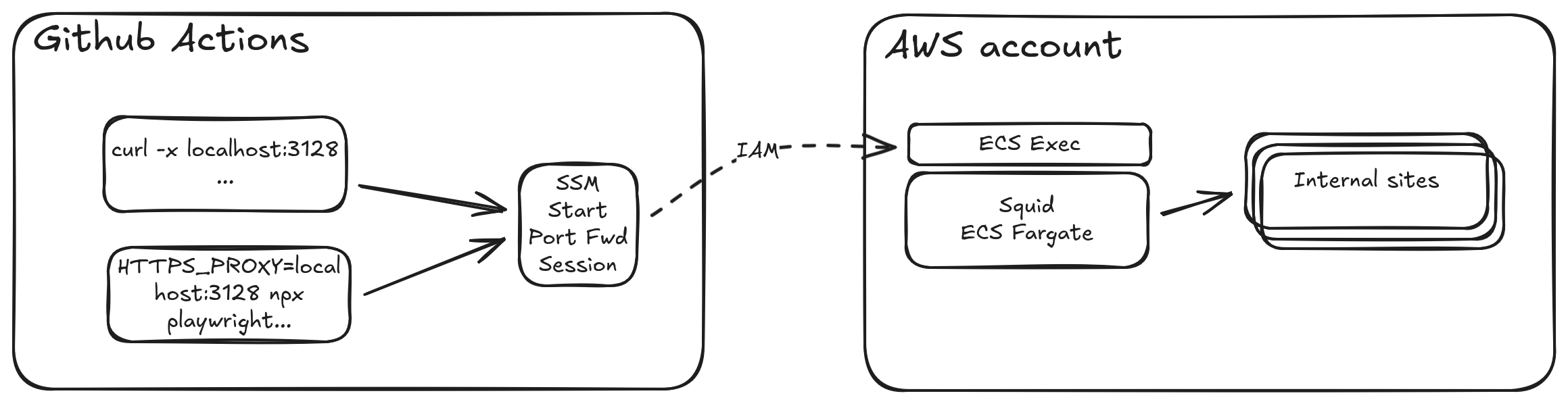
In this example I’m going to set up a Squid proxy server, as my main use case is to run UI tests using Playwright. However, this approach can be used for any type of proxy server, such as HAProxy for TCP connections.
Create the Squid service
Start by creating an ECS Fargate task that runs the squid proxy server.
resource "aws_ecs_task_definition" "automation_test_squid" {
...
    network_mode = "awsvpc"
    container_definitions = << DEFINITION
    [
        {
            "name": "squid",
            "image": "ubuntu/squid",
            "portMappings": [
                {
                    "protocol": "tcp",
                    "containerPort": 3128,
                    "hostPort": 3128
                }
            ],
            "essential": true,
            "entryPoint": [],
            "command": []
        }
    ]
    DEFINITION

    requires_compatibilities = ["FARGATE"]
    cpu = "1024"
    memory = "2048"
 ...
When setting up the permissions for this task, ensure that it has these ssmmessages permissions attached:
{
    "Version": "2012-10-17",
    "Statement": [
        {
            "Effect": "Allow",
            "Action": [
                "ssmmessages:CreateControlChannel",
                "ssmmessages:CreateDataChannel",
                "ssmmessages:OpenControlChannel",
                "ssmmessages:OpenDataChannel"
            ],
            "Resource": "*"
        }
    ]
}
Next, create an ECS service for that task definition, and ensure that the ECS Exec feature is enabled on that service:
resource "aws_ecs_service""automation_testing_squid" {
    name          = "squid"
    cluster       = aws_ecs_cluster.automation_testing.arn
    desired_count = 1

    enable_execute_command = true # <--- important!

    lifecycle {
      ignore_changes = all
    }
    ...
}
Run this and you should have an ECS Service running the Squid proxy server, with the ECS Exec feature enabled.
Set up GitHub OIDC provider and permissions
To allow GitHub Actions to connect to AWS securely, set up an OIDC provider and create an IAM role with permissions to start and terminate SSM sessions on the specific ECS tasks running the Squid service. I like to use the unfunco/oidc-github/aws module as it’s quite simple and readable.
module "iam_identity_provider_automation_testing"{
    source = "unfunco/oidc-github/aws"
    version = "1.8.1"
    create_oidc_provider = true  # set it to false if you already have one
    iam_role_name = "automation_testing_github_actions_permissions"
    github_repositories = [
        "mendhak/repo1",
        "mendhak/repo2" #<-- specific repos
    ]
    ...
}

data "aws_iam_policy_document" "automation_testing_ssm_policy"{
 statement {
 actions = [
            "ssm:StartSession",
            "ssm:TerminateSession",
            "ssm:ResumeSession"
        ]
 effect = "Allow"
 resources = [
            "arn:aws:ecs:eu-west-1:*:task/automation_testing/*"
        ] # <-- The specific squid service tasks
    }
 ...
}
Use it in GitHub Actions
Now that the AWS side is ready, add a step to the Github Actions workflow to set up the port forwarding to the Squid ECS task. Below is a sample Github action that does this.
These steps get the Task ID and Runtime ID needed to start the tunnel, then starts the SSM session forwarding local port 3128 to port 3128 on the Squid task.
There’s a curl step included to test that the proxy is working, and finally a cleanup step that terminates the session.
steps:
    - name: Configure AWS credentials
      uses: aws-actions/configure-aws-credentials@v2
      with:
        aws-region: $NaN
        role-to-assume: arn:aws:iam::$NaN:role/$NaN

    - name: 'Get Squid Task ID'
      id: get-squid-task-id
      shell: bash
      run: |
        squid_task_id=$(aws ecs list-tasks --cluster github_actions_proxy --service-name squid --region $NaN --query 'taskArns[0]' --output text | cut -d "/" -f 3)
        echo "Squid task id: $squid_task_id"
        echo "squid_task_id=$squid_task_id" >> $GITHUB_OUTPUT

    - name: 'Get Squid Runtime ID'
      id: get-squid-runtime-id
      shell: bash
      run: |
        squid_runtime_id=$(aws ecs describe-tasks --cluster github_actions_proxy --task $NaN --region $NaN --query 'tasks[].containers[0].runtimeId' --output text)
        echo "Squid runtime id: $squid_runtime_id"
        echo "squid_runtime_id=$squid_runtime_id" >> $GITHUB_OUTPUT

    - name: 'Start SSM Session'
      id: start-ssm-session
      shell: bash
      run: |
        aws ssm start-session --target ecs:github_actions_proxy_$NaN_$NaN --document-name AWS-StartPortForwardingSession --parameters '{"portNumber":["3128"], "localPortNumber":["3128"]}' --region $NaN > ssm_output.txt 2>&1 &
        sleep 10 # Give it a moment to ensure the command has output the session Id
        echo "Contents of ssm_output.txt:"
        cat ssm_output.txt
        echo "Attempting to extract Session Id..."
        SESSION_ID=$(grep -oP 'SessionId: \K[a-zA-Z0-9-]+' ssm_output.txt | head -1)
        if [ -z "$SESSION_ID" ]; then
            echo "::error::Session Id not found in the output"
            exit 1
        fi
        echo "Extracted Session ID: $SESSION_ID"
        echo "ssm_session_id=$SESSION_ID" >> $GITHUB_OUTPUT

    - name: Test with curl
      run: |
        curl -x localhost:3128 https://ipinfo.io

    - name : 'Stop SSM Session'
      id: stop-ssm-session
      uses: gacts/run-and-post-run@v1
      with:
        post: |
          echo "Ending SSM Session"
          aws ssm terminate-session --session-id $NaN --region $NaN
          echo "SSM Session Ended"
The curl step is just an example; it would be replaced with the actual steps that need access to internal AWS resources via the proxy. For Playwright, setting up a proxy server would involve modifying the config:
proxy: process.env.PROXY_SERVER ? { server: process.env.PROXY_SERVER } : undefinedThen, pass the PROXY_SERVER environment variable in the GitHub Actions workflow:
    - name: Run Playwright tests
      run: npx playwright test
      env:
        PROXY_SERVER: http://localhost:3128
Notes
There is of course a cost associated here, that of running the ECS Fargate task, however it does scale pretty well as it can be used by many Github Actions workflows, which makes it cost effective. Fargate is generally pretty cheap, but it can also be set up as a Fargate Spot task to reduce costs even further.
The use of Session Manager here means that there are no open inbound ports on the ECS task or VPC, and no need to manage SSH keys or VPNs. The connection is secure and temporary, only lasting for the duration of the GitHub Actions workflow run.
Squid is a pretty flexible example, because it requires almost no modifications to the calling client code, not only does it handle the requests, but it handles the DNS resolution as well.
Squid will work well for HTTP and HTTPS traffic, but for other protocols you may need to look at HAProxy or Nginx; the approach would be similar but there would be configuration needed over on the HAProxy/Nginx side to handle specific ports and forward to destinations.